
※ご注意
Windowerとアドオンは、スクウェア・エニックス公式のサポート対象外のサードパーティ製ツールです。ご利用の際は、遊んでいるサーバーの最新の規約をご自身でご確認ください。
当ブログのLuaや設定は個人で動作確認したものです。導入・使用は自己責任でお願いします。
※1人の操作で他のキャラを自動で動かすタイプのツールは、サーバーによっては規約で禁止されています。必ず事前にご確認ください。
FF11 を複数アカウントで遊んでいると、ウィンドウの切り替えが地味に大変ですよね。キーボードで Alt+Tab するのも戦闘中は焦るし…。
今回は Xbox コントローラーの LB/RB ボタンだけで、複数の pol.exe ウィンドウをサクサク切り替えられる AutoHotkey v2 スクリプトを紹介します。起動時に順番も自分で決められるので、使いやすさ抜群です!
⚠️ エンターキーが押せなくなる不具合について 環境によっては、ウィンドウ切り替え後にエンターキーが効かなくなることがあります。このスクリプトは発生頻度を抑える対策を入れていますが、完全に解消できない場合もあります。 その場合は FFXI Switch Monitor を使った方法が安定しています。→ FFXI Switch Monitor でウィンドウを切り替える方法
必要なもの
- AutoHotkey v2.0
- Xbox コントローラー(有線・無線どちらでも OK)
- Windows 10 / 11
AutoHotkeyのダウンロード・インストール方法は別記事にまとめたので、まだ入れていない場合はそちらを先にどうぞ。
特徴
- 🎮 LB で前のウィンドウ、RB で次のウィンドウに切り替え
- 🔁 ループ対応:最後のウィンドウから RB を押すと最初に戻る
- 📋 起動時に順番を自分で設定できる
- 👥 何キャラでも対応:2キャラでも6キャラでも自動検出
- ⚡ 戦闘中でもサクサク動く
- 🚫 二重入力なし:切り替え中に誤操作しない
事前準備:FFXI のゲームパッド設定
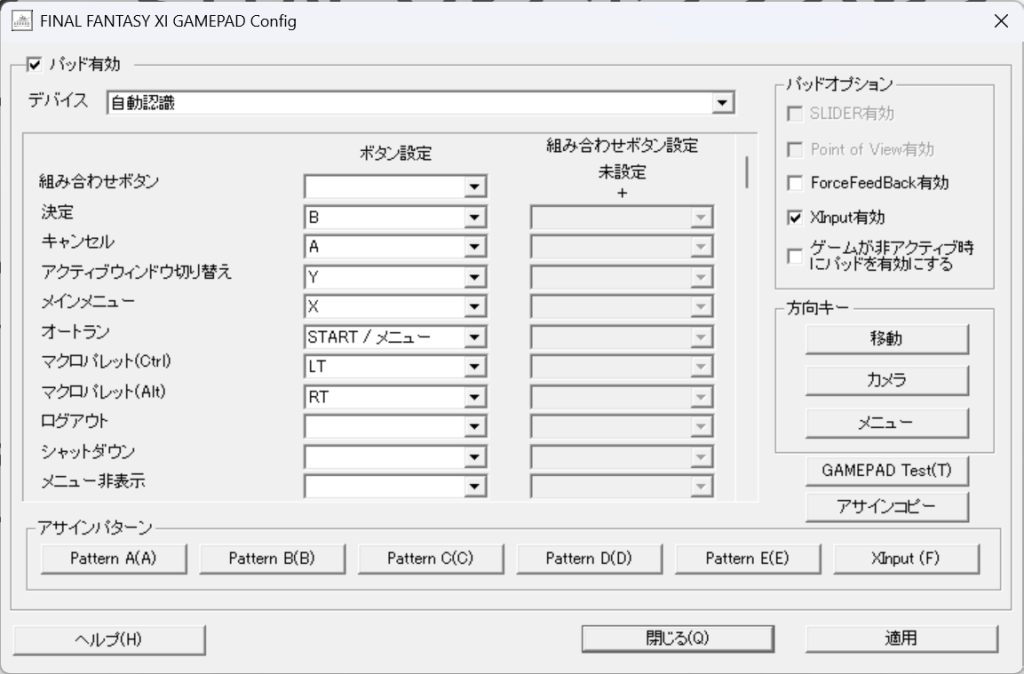
スクリプトを使う前に、FFXI 側のゲームパッド設定を正しく行う必要があります。
FFXI のゲームパッド設定画面を開いて、右上の 「XInput 有効」にチェックを入れてください。これがオフになっているとスクリプトがコントローラーを認識できません。
また、LB と RB は FFXI 側の機能に割り当てないようにしておくと誤操作が防げます。
必要なもの
- AutoHotkey v2.0(公式サイト からダウンロード)
- Xbox コントローラー(有線・無線どちらでも OK)
- Windows 10 / 11
特徴
- 🎮 LB で前のウィンドウ、RB で次のウィンドウに切り替え
- 🔁 ループ対応:最後のウィンドウから RB を押すと最初に戻る
- 📋 起動時に順番を自分で設定できる
- 👥 何人でも対応:2キャラでも6キャラでも自動検出
- ⚡ 戦闘中でもサクサク動く
- 🚫 二重入力なし:切り替え中に誤操作しない
スクリプトの使い方
1. ファイルを作成する
メモ帳などのテキストエディタを開いて、下のコードを貼り付けて ff11switch.ahk という名前で保存してください。
#Requires AutoHotkey v2.0
#SingleInstance Force
#WinActivateForce

polWindows := []
currentIndex := 1
isSwitching := false
orderedWindows := []

ShowOrderGui() {
    global orderedWindows

    orderedWindows := []
    tempList := []

    for hwnd in WinGetList("ahk_exe pol.exe")
        tempList.Push(hwnd)

    if (tempList.Length == 0) {
        MsgBox("pol.exe のウィンドウが見つかりませんでした。")
        ExitApp()
    }

    orderGui := Gui("+AlwaysOnTop", "ウィンドウの順番を設定")
    orderGui.Add("Text", "w300", "切り替えたい順番にボタンを押してください。")
    orderGui.Add("Text", "w300", "全部押したら「決定」を押してください。")
    statusText := orderGui.Add("Text", "w300", "選択済み: 0 / " tempList.Length)

    for hwnd in tempList {
        title := WinGetTitle("ahk_id " hwnd)
        if (title == "")
            title := "ウィンドウ " A_Index
        btn := orderGui.Add("Button", "w300", title)
        btn.OnEvent("Click", MakeHandler(hwnd, btn, statusText, tempList.Length))
    }

    doneBtn := orderGui.Add("Button", "w300 Disabled", "決定")
    doneBtn.OnEvent("Click", (*) => orderGui.Destroy())
    orderGui.Show()

    WaitForGui(orderGui, tempList.Length, doneBtn)
}

MakeHandler(hwnd, btn, statusText, total) {
    return (ctrl, *) => HandleButtonClick(hwnd, btn, statusText, total)
}

HandleButtonClick(hwnd, btn, statusText, total) {
    global orderedWindows
    for item in orderedWindows
        if (item == hwnd)
            return
    orderedWindows.Push(hwnd)
    btn.Enabled := false
    statusText.Text := "選択済み: " orderedWindows.Length " / " total
}

WaitForGui(gui, total, doneBtn) {
    global orderedWindows
    Loop {
        Sleep(100)
        try {
            if (orderedWindows.Length == total)
                doneBtn.Enabled := true
            if (!gui.Hwnd)
                break
        } catch {
            break
        }
    }
}

SwitchWindow(direction) {
    global polWindows, currentIndex, isSwitching

    if (isSwitching || polWindows.Length == 0)
        return

    isSwitching := true

    if (direction == "next")
        currentIndex := (currentIndex == polWindows.Length) ? 1 : currentIndex + 1
    else
        currentIndex := (currentIndex == 1) ? polWindows.Length : currentIndex - 1

    WinActivate("ahk_id " polWindows[currentIndex])

    isSwitching := false
}

F13::SwitchWindow("prev")
F14::SwitchWindow("next")

GetXInputState() {
    static buf := Buffer(16, 0)
    if (DllCall("xinput1_4.dll\XInputGetState", "uint", 0, "ptr", buf) != 0)
        return false
    return NumGet(buf, 4, "ushort")
}

prevButtons := 0

PollController() {
    global prevButtons

    buttons := GetXInputState()
    if (buttons == false) {
        prevButtons := 0
        return
    }

    if (buttons & 0x0100) && !(prevButtons & 0x0100)
        Send("{F13}")

    if (buttons & 0x0200) && !(prevButtons & 0x0200)
        Send("{F14}")

    prevButtons := buttons
}

ShowOrderGui()
polWindows := orderedWindows
currentIndex := 1

if (polWindows.Length > 0)
    WinActivate("ahk_id " polWindows[1])

SetTimer(PollController, 16)
2. FFXI を先に起動しておく
スクリプトを実行する前に、切り替えたいキャラクター分の pol.exe を全部起動しておいてください。
3. スクリプトを管理者として実行する
ff11switch.ahk を右クリック → その他のオプションを確認 → 管理者として実行で起動してください。
毎回右クリックが面倒な場合は、ショートカットのプロパティ → 互換性タブ → 「管理者としてこのプログラムを実行する」にチェックを入れると次回から普通にダブルクリックで起動できます。
4. 順番を設定する
起動するとこんなウィンドウが表示されます。切り替えたい順番にボタンを押していくと、押したボタンがグレーアウトされます。全部押すと「決定」ボタンが有効になるので押してください。
5. あとはコントローラーで切り替えるだけ!
- RB → 次のウィンドウ
- LB → 前のウィンドウ
- 最後まで行ったら自動でループします
よくある質問
Q. コントローラーがなくても使えますか? A. このスクリプトは Xbox コントローラー専用です。
Q. 何キャラまで対応していますか? A. 上限はありません。起動している pol.exe の数だけ自動で検出されます。
Q. エンターキーが押せなくなることがあります。 A. 環境によって発生することがあります。完全には解消できていないため、安定して使いたい方は FFXI Switch Monitor を使った方法 をお試しください。
Q. スクリプトを終了するにはどうすればいいですか? A. タスクトレイの AutoHotkey アイコンを右クリックして「Exit」を選んでください。
まとめ
戦闘中でもコントローラーの LB/RB でサクサクウィンドウを切り替えられるので、マルチボックスのプレイがかなり快適になります。ぜひ試してみてください!
エンターキーの不具合が気になる方は FFXI Switch Monitor を使った方法もあわせてご覧ください。
コメント